Blog Post
Announcing ai-kit: Stateful Agentic Applications in Rust
- rust
- ai
- agents
- open-source
- workflows
ai-kit, a collection of Rust libraries for building agentic AI applications, is now open source. Its five crates cover model providers, executable tools, storage, agent runtimes, and stateful workflows. You can use them individually or compose them into applications with explicit state, checkpoints, and recovery. The project is in early development; the Rust components and examples described here are available today.
Motivation
An agentic application needs to coordinate work across model calls, tools, and application state. For instance, a code review assistant might inspect a repository, propose a change, run validation tools, and wait for a developer's input. The application must retain the results of each step and decide what can safely happen next after a failure or interruption.
The repository's author/reviewer workflow illustrates a smaller version of this problem. An author agent produces a structured artifact, which the workflow commits to state before passing it to a reviewer. The review is then retained alongside the artifact. The handoff depends on committed output, not just the text a model streams while it works.
For a service already written in Rust, keeping this orchestration in Rust lets the workflow share types, asynchronous execution, and resource ownership with existing business logic. A team may also have a database, an internal model gateway, or tools it wants to retain. Replacing those components should not require rewriting the workflow.
Provider-specific message formats and runtime assumptions can otherwise spread into application code. ai-kit addresses this by separating integration contracts from workflow definitions: you construct the provider, tools, agents, and storage in Rust, while the workflow describes state changes and control flow.
Architecture
ai-kit is organized as five independently usable crates:
| Crate | Responsibility |
|---|---|
providers-kit |
Model generation, streaming, embeddings, and batches through OpenAI, Anthropic, Gemini, and Ollama implementations. Supplied sessions currently support OpenAI only. |
storage-kit |
Application data and search through Database, plus transactional control state through StateStore. |
tools-kit |
Executable local and Model Context Protocol (MCP) tools, with optional MCP serving. |
agents-kit |
Agent, workspace, and conversation lifecycles over Codex App Server, OpenCode Server, and Custom provider-backed agents. |
app-kit |
Stateful workflow execution, checkpoints, retained history, and recovery over caller-supplied agents and storage. |
A service that only needs model access can start with providers-kit. An application with an existing agent runtime can implement the agent traits and use app-kit for orchestration.
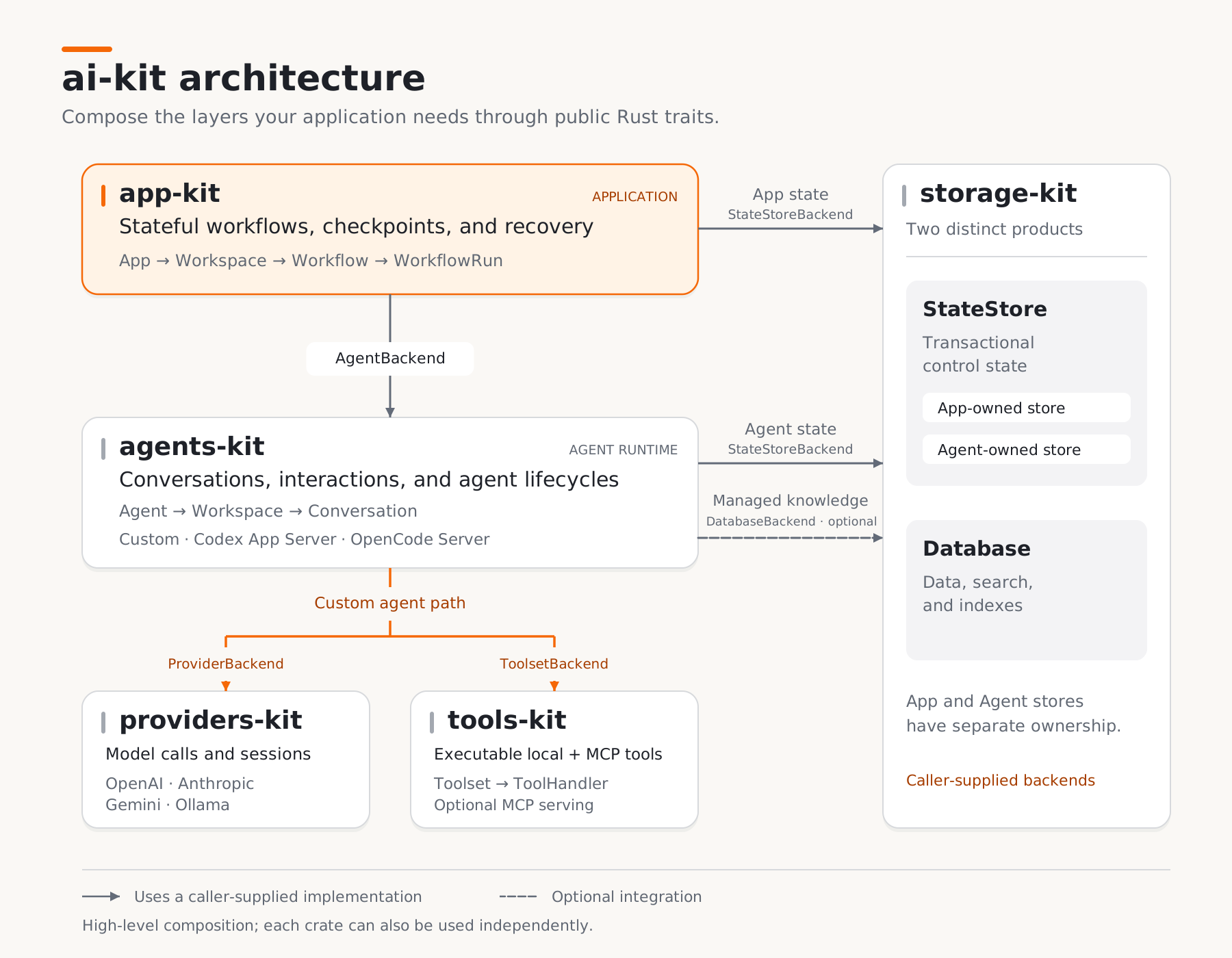
Figure 1. The five crates compose through public backend traits. Provider and tool connections below the agent layer describe the Custom agent path.
View full-size diagram · Architecture document
At the application level, app-kit receives already-built agents and a caller-selected state store. Workflow definitions select agents by logical key; they do not contain provider credentials or reconstruct integrations. After a successful open, the App owns shutdown of the transferred agents, as described in the integration guide.
Within a Custom agent, agents-kit owns the multi-turn prompt and tool loop. It delegates model calls to providers-kit, executable tools to tools-kit, and optional managed knowledge to a DatabaseBackend. Codex and OpenCode instead use their native runtime integrations through the same agent layer.
App checkpoints and Agent control records have separate ownership and use separately supplied state stores, even when those stores share an underlying service. Database serves a different purpose: storing and searching application data, including managed knowledge.
Stateful workflows and recovery
app-kit runs workflows defined by state, nodes, routes, and reducers. You load a versioned definition, prepare a run, and acquire execution to advance its nodes. Nodes can change state, invoke agents or custom actions, request input, and compose other workflows. Branches, joins, and bounded child or map execution support more involved control flow.
Parallel actions read a shared committed base and stage their contributions. Reducers then combine those contributions, for example by collecting results into an array or rejecting concurrent writes to a field. For the same base state and contributions, reducers produce the same committed state regardless of sibling completion order. Model responses themselves can still vary.
Checkpoints preserve committed state and execution position. You can inspect retained history, initialize a new run from a selected checkpoint, or reopen existing work with the required workflow and agent revisions. In the author/reviewer workflow, this makes the committed artifact available for inspection separately from the conversation that produced it. The recovery guide explains the operations and their prerequisites.
Checkpointing does not undo external side effects or guarantee exactly-once execution of an external API call. An uncertain App-owned agent effect remains unresolved until the caller accepts it, fails it, or establishes that retrying is safe. Custom actions must reconcile their own external effects.
Getting started
Run the local example
The source covered here requires Rust 1.99 or newer and pins its development toolchain. Workflow examples also compile native storage dependencies; install the build prerequisites, including a native compiler toolchain, libclang, CMake, and Protobuf tooling.
Start with the credential-free pure_state example at the article's pinned revision:
git clone https://github.com/jecsand838/ai-kit.git
cd ai-kit
git checkout --detach 8184f485d8ac517976409e2953355753c155ee0a
cargo run --locked -p app-kit --example pure_state
It executes two state-changing nodes, checks the committed result, and prints:
count: 2; label: complete
For a separate Cargo project, install the individual crate you need. The published-package example uses
cargo add tools-kit@=0.0.1; this checkout is preparing0.0.2. Use documentation matching your code revision. Backwards compatibility is not guaranteed before1.0.0, so pin exact versions when reproducibility matters.
Inspect state and execution
The complete linear_state.json definition uses the app-kit.workflow/v2 schema. It starts with count = 0 and label = "pending". This excerpt shows just the first node, not a complete workflow document:
{
  "id": "first",
  "step": {
    "kind": "state",
    "mutations": [
      {
        "kind": "increment",
        "target": "count",
        "value": {"kind": "literal", "value": 1}
      }
    ]
  }
}
In the complete definition, a route sends execution to a second node, which increments the count again and assigns the label "complete". Both fields use reject_concurrent reducers, so concurrent contributions to either field would be rejected.
The Rust executable parses the definition with WorkflowDefinition::parse, connects an in-memory Lance StateStore, and opens an App with an empty agent inventory. The inventory has an Agent type annotation, but no agent instance or model credentials are needed. After creating a workspace, it executes the workflow with these calls:
let workflow = workspace.workflow("linear_state".parse()?).await?;
let mut run = workflow.prepare(WorkflowState::default()).await?;

let completed = run
    .execution(ExecutionOptions::default())
    .await?
    .finish()
    .await?;
This is an excerpt; the complete executable supplies imports, setup, an async entrypoint, timeouts, result checks, and explicit shutdown. prepare commits the initial checkpoint without executing the entry node. Calling finish drives execution and returns a snapshot with status and committed state. Inspect both: a workflow requesting input can pause before reaching a terminal result.
The memory store retains records while it is alive; surviving process exit requires persistent storage. Follow the executable's shutdown pattern to drain accepted work before the runtime exits, including when execution fails or times out.
Add recovery and agents
Next, run the history and recovery example:
cargo run --locked -p app-kit --example history_and_recovery
It restores a checkpoint into a new run with the count overridden to 40, then executes the remaining increment to produce 41. It also reopens the retained result in a new App over the same in-memory store. This demonstrates recovery within one process, rather than persistence across process exits.
To run the author/reviewer workflow introduced above, construct agents and register them with AgentSpec::new; workflow nodes select their logical keys. The multi_agent executable requires two running, model-configured OpenCode services and an existing workspace directory. Follow the multi-agent guide for setup and the sequential and parallel definitions.
The actions_and_inputs example adds ordinary Rust business logic through a custom ActionBackend. It also distinguishes transient execution inputs from explicit writes to persisted state, so applications can choose which input values become part of a run's retained history.
Custom backends through Rust traits
The supplied implementations and application-defined backends use the same public contracts. These include ProviderBackend, ToolsetBackend, StateStoreBackend, and AgentBackend. Direct trait composition preserves concrete implementations and their associated types: a provider returns its own model type, a state store its transaction type, and an agent its workspace and conversation types.
For example, this function, adapted from the App integration guide, accepts any compatible agent and state store:
use agents_kit::AgentBackend;
use app_kit::{AgentSpec, App, AppConfig, AppError};
use app_kit::workflow::WorkflowDefinition;
use storage_kit::StateStoreBackend;

pub async fn open<CS: StateStoreBackend, A: AgentBackend>(
    state: CS,
    agents: Vec<AgentSpec<A>>,
    definitions: Vec<WorkflowDefinition>,
) -> Result<App<CS, A>, AppError> {
    App::open(AppConfig::new(state, agents, definitions)).await
}
An internal agent runtime or custom state store can participate without conversion into a supplied handle. To select among unrelated implementation types at runtime, an application can define enums implementing the matching parent and child traits.
Provider messages and function calls use common request and response types; local and MCP tools share toolset and handler interfaces. Capabilities still vary by provider and exact model. Unsupported operations return errors, so changing providers requires validating both the application's requirements and model behavior.
Workflow customization has separate contracts for actions, conditions, state typing, lifecycle hooks, and child execution. The actions guide shows how business logic can read execution inputs and stage state changes. The same backend traits also support test-local implementations that exercise real Agent and App consumers without provider credentials, including state transitions and recovery decisions.
Next steps
Python bindings are planned to expose the Rust components while retaining their execution, persistence, and lifecycle behavior. PyO3 is a proposed approach; the binding technology, asynchronous API, and packaging remain subject to the design tracked in that issue. The examples in this article use the current Rust APIs.
Integration work also remains:
- Provider-managed paused continuation in Custom agents is unfinished.
- Selected OpenCode v2 permission and question mappings need implementation.
- Stateless OpenAI audio and Gemini interactive sessions are unsupported. OpenAI Realtime and stateless Gemini generation are separate supported paths.
Closing
The source and runnable examples are available on GitHub. I welcome feedback from developers using these components, especially where a backend contract is difficult to implement or an integration is incomplete. Open an issue or follow the contributor guide to help.